License plate detection (LPD) is a famous application of digital image processing and machine learning in intelligent transport systems (ITS). In other words, many services of ITS depend on LPD. LPD serves as the critical front‑end for automated toll collection, traffic law enforcement, parking management, vehicle tracking, and many other ITS functions. Its reliability directly influences the overall system accuracy. We call the act of finding and reading license plate (LP) numbers from a digital image as license plate recognition, I notice that it is different from license plate recognition (LPR). Here, by the word "detection" we mean localization and by the word "recognition" we mean localization + reading. So, LPR softwares consist two main steps:
- License plate detection (LPD)
- Optical character recognition (OCR)
In LPD step, we should find bounding box of LP(s). In other words, we should find location of each license plate and determine a rectangle box surrounding it. Accurate localization is essential; even a slight misalignment may cause the subsequent OCR to fail. The box must tightly enclose the plate while avoiding surrounding clutter such as bumpers, shadows, or vehicle logos. After that we should read numbers and characters of it using OCR. LPD is assumed as main step of LPR systems because other step(s) depend on it and there is a lot research in OCR.
In this article we use opencv library to implement a simple license plate detection approach (we do not use implement ocr). The method relies on classical computer vision techniques – edge detection and contour analysis – which are computationally lightweight and do not require a pre‑trained model. For LPD step we try to find LP by its appearance and geometrical features. This simplicity, however, comes at the cost of reduced robustness under real‑world conditions, as will be discussed in the challenges section.
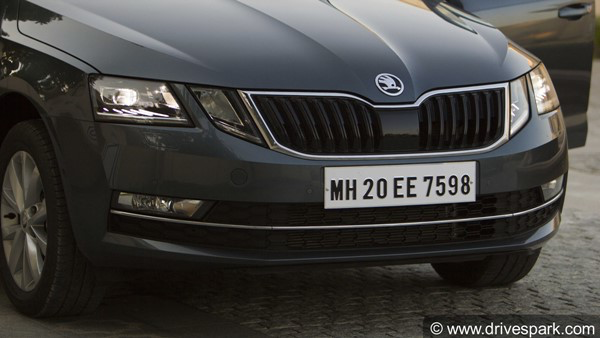
Fig, 1 depicts a sample of input image. As it can be seen license plate is a rectangular shape. Contour detection is a common way to detect a region and then analysis . Many of variants of aforementioned ways accept binary image input. Due to high contrast between LP segments and other segments strong edges (color or gray level jumps) has been created in border of LP. Typically, a license plate features dark characters on a bright reflective background (or vice versa), producing sharp intensity transitions that an edge detector can capture. So a edge detector can detect and separate LP region. We use Canny edge detector because it can repair deleted edges caused by noises. Its hysteresis thresholding connects fragmented edge segments, making it fairly tolerant to mild image noise while preserving true plate boundaries. So for LPD following steps must be done:
- Reading input image
- Converting input image to gray level
- Applying Canny edge detection
- Applying contour detection
- geometrical Analysis
Before any thing we should import necessary libraries:
import cv2 import numpy as np import random as rnd
cv2 has been used for opencv methods. numpy is a calculation library for efficient array operations, and random has been used for creating random numbers to colour the detected contours in the visualisation.
Reading input image
for reading input image you must call imread method:
im = cv2.imread('D:/dataset/andrewmvd/images/cars111.png', cv2.IMREAD_UNCHANGED)here, we read input from the path as image unchanged. you can use cv2.IMREAD_GRAYSCALE flag instead of cv2.IMREAD_UNCHANGED in order to read the image as grayscale. if you use unchanged flag, you should convert it grayscale using cv2.cvtColor method. Since I want to use main image for showing final result, I should use the conversion. Working with a single‑channel image reduces computational complexity and allows the edge detector to focus on intensity variations rather than colour information.
gray = cv2.cvtColor(im, cv2.COLOR_BGR2GRAY)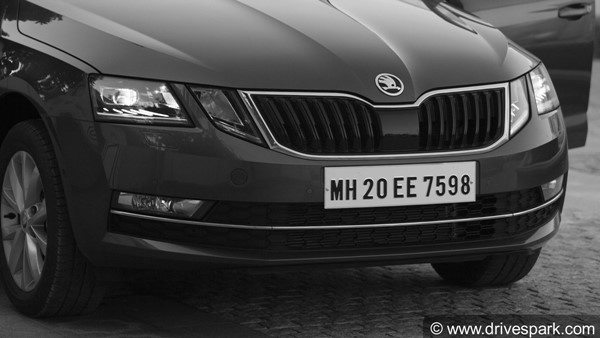
as it can be seen in Fig. 2, color images is converted to gray-scale to be fed to remaining part of the LPD approach.
Applying Canny edge detection
After reading an image you must apply Canny edge detection.
edge = cv2.Canny(gray, threshold1=200, threshold2=200)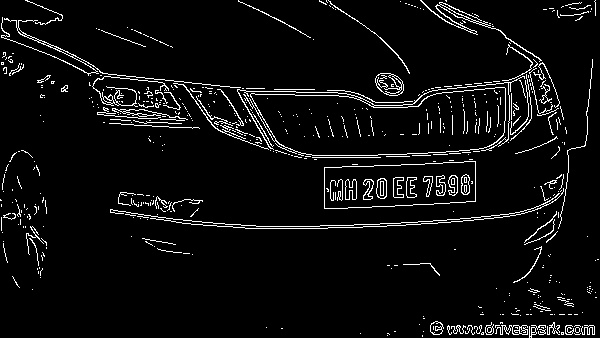
Canny edge detector requires two main hyper parameters including threshold1 and threshold2. The first one is sensitivity of thresholding and second one is strongness of linking (or repairing) edges. In detail, any pixel with a gradient magnitude above threshold2 is considered a strong edge, while those between the two thresholds are retained only if they are connected to strong edges. You should choose them by test and try based on the contrast of your typical scene.
Applying contour detection
By applying contour detection, we can find all components of Fig, 3. In order to show found bounding box (or rotated rects) of contours, we use a piece of code which is not necessary in a real scenario. Here, minAreaRect computes the minimum area rotated rectangle that encloses each contour, making the method tolerant to slight plate rotations.
# Find contours
  contours, _ = cv2.findContours(edge, cv2.RETR_TREE, cv2.CHAIN_APPROX_SIMPLE)

  # Draw contours
  drawing = np.zeros((edge.shape[0], edge.shape[1], 3), dtype=np.uint8)
  for i in range(len(contours)):
      color = (rnd.randint(0, 256), rnd.randint(0, 256), rnd.randint(0, 256))
      rect = cv2.minAreaRect(contours[i]) box = np.int0(cv2.boxPoints(rect))
      cv2.drawContours(drawing, [box], 0, color, 2, cv2.LINE_8)

  cv2.imshow('a', drawing)
  cv2.waitKey()
findContours method will find contours or connected components of edge image shown in Fig, 3. Remaining part of the codes draws contours in the edge image that you can remove them.
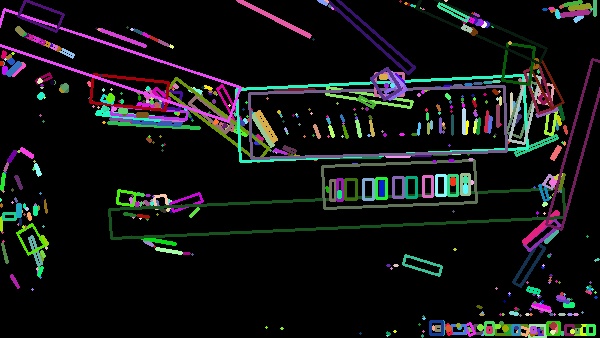
As it can be seen in Fig, 4, there are lot of contours. I should notice that color of each contour is generated randomly, so it will be different in your computer.
Geometrical Analysis
Now, we should choose correct contour by filtering them using its geometrical properties (or other properties!). As you can see, LP contour is a horizontal rectangular shape. In most countries, standard plates have a fixed aspect ratio (width/height) and a known range of physical dimensions, which we exploit to discard false detections such as lines on the road, grilles, or other rectangular vehicle parts.
def filter_contours(
    cnts,
    min_w, max_w,
    min_h, max_h,
    min_whr, max_whr):res = []
        for i in range(len(cnts)):
            rect = cv2.minAreaRect(contours[i])
            (cx, cy), (w, h), a = rect
            whr = w/h

            if(w > max_w or
                w < min_w or
                h > max_h or
                h < min_h or
                whr > max_whr or
                whr < min_whr)
                continue

            res.append(rect)
    return res
here we define filter_contours method to filter unwanted contours. As it can be first we find rect using minAreaRect method. whr is weight to height ratio. Then each found properties of each rect is compared to min_w, max_w, min_h, max_h, min_whr, and max_whr. if they are not within in a predefined range they will be rejected, else they will be added to to res as result.
Now we fix all of them and depict the result as one piece of code, you can assume this part of code as main function
# Find contours contours, _ = cv2.findContours(edge, cv2.RETR_TREE, cv2.CHAIN_APPROX_SIMPLE)
Filtering contours
contours = filter_contours(contours, 150, 200, 40, 60, 3, 5)

Draw contours
drawing = np.zeros((edge.shape[0], edge.shape[1], 3), dtype=np.uint8)
color = (100, 10, 200)
for i in range(len(contours)):
rect = contours[i]
box = np.int0(cv2.boxPoints(rect))
cv2.drawContours(im, [box], 0, color, 2, cv2.LINE_8)
cv2.imshow('a', im)
cv2.waitKey()
By filtering contours, all unwanted contours will be removed:
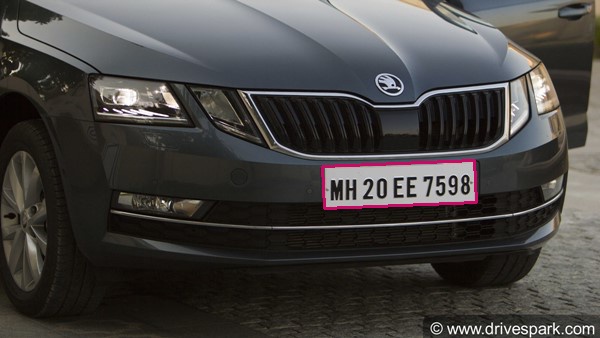 |
| Fig, 5) result of the LPD procedure |
Result of the LPD procedure has been illustrated in Fig, 5. The chosen geometric filters successfully isolated the license plate from the many candidate regions. However, this clean result relies on a well‑framed, high‑contrast image. The next section outlines the challenges that make LPD far more difficult in practical, uncontrolled settings.
Challenges in Real-World License Plate Detection
The simple contour‑based method demonstrated above performs adequately on the given example, but real‑world deployments face a multitude of complications that demand far more advanced techniques. Below we outline the key obstacles that any practical LPD system must overcome.
- Blur: Motion blur from fast‑moving vehicles or camera shake, as well as out‑of‑focus conditions, smears the sharp edges that the detector relies on. Even a small amount of blur can break the continuity of plate contours, causing missed detections or heavily distorted bounding boxes.
- Resources (CPU, RAM, FPS): Many ITS applications run on embedded devices (e.g., roadside cameras, Jetson, or Raspberry Pi‑based systems) with limited processing power and memory. A detector must run in real time, often at 25–30 frames per second, while leaving enough headroom for OCR and other tasks. Heavy algorithms that consume too much CPU or RAM are impractical in such environments.
- Dust, dirt, and occlusion: Plates are frequently covered by mud, snow, dust, or bugs. Physical obstructions like tow hitches, bike racks, or trailer couplings can partially hide the plate. These occlusions disrupt the rectangular shape and edge map, making purely geometric filtering unreliable.
- Rotation and skew: Cameras are rarely mounted perfectly perpendicular to the plate. Perspective distortion, vehicle tilt on uneven roads, or the plate’s own mounting angle introduce rotation and skew. Although minAreaRect can handle some rotation, extreme angles change the apparent aspect ratio and may fall outside the fixed filtering thresholds.
- Different sizes due to distance: The apparent size of a license plate varies dramatically with the distance between the camera and the vehicle. A plate that is 150 pixels wide at 5 metres may be only 40 pixels wide at 20 metres. Fixed width/height thresholds as used in our simple approach will fail when the scale changes. A robust system must be scale‑invariant or handle multi‑scale detection.
- Different types of plates: License plates differ widely across countries and regions – they come in various colours, fonts, layouts (single‑row, double‑row), reflective materials, and aspect ratios. Some jurisdictions even issue plates with logos, background graphics, or coloured borders that confuse edge‑based detectors. A system trained on one plate style may perform poorly on another without adaptation.
- Other real‑world distortions: Strong lighting variations (glare from direct sunlight, deep shadows, nighttime low contrast, headlight reflections) dramatically alter the edge map. Adverse weather (rain, fog, snow) reduces visibility and adds noise. Additionally, multiple plates may appear in the same frame (e.g., motorcycles, stacked plates), and partial plates near the image border can be missed by contour retrieval methods that require closed boundaries.
Addressing these challenges typically requires moving beyond hand‑crafted features towards learning‑based detectors (e.g., convolutional neural networks) that automatically learn robust representations. Data augmentation, multi‑scale processing, and careful hardware‑aware optimisation become essential for reliable, real‑world license plate detection.